Fast charging and protecting your smart phone’s battery life.
Do you want to charge your smart phone safely and keep the battery life good for as long as possible?
Are you surprised at how slowly your smart phone appears to charge sometimes?
Are you confused by the different cables and chargers around?
If you answered yes to just one of these, you’ve come to the right place…
Your smart phone’s Lithium-Ion battery is an incredibly sophisticated component that has evolved to supply reliable power for much of the day, safely, and for an extended lifetime of 1,000 charges.
Over those 1,000 charges, your battery will start to deteriorate and not yield the life it had when it was new.
A key way to reduce that degradation is NOT to charge it past 80-90% if you don’t have to and ideally keep it above 10-20%. This may mean charging it twice daily to keep it in that range and skipping overnight charging to 100%.
Like most people, you’ve probably got several chargers you’ve received with smart phone purchases over the years.
If you’re still using the charger that came with a smartphone just a few years ago, you need to change it!
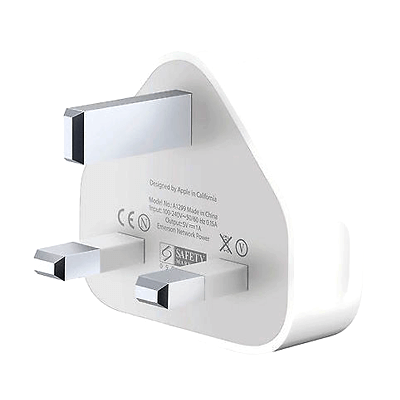
👈 If you are using one of these to charge your iPhone 8 onwards, it’s only providing between 18-30% of the power your smart phone needs.
In other words, your smart phone could be charging up to five times slower than it’s capable of. 😳
Why Battery Size Matters
Smart phones now have 3-4X more battery capacity than just a decade ago. You may not have noticed the change as it has been a gradual change in line with smart phones getting thinner. While some of that capacity provides better battery life, more is used because smartphones now have giant screens and are more power-hungry. What could charge a smart phone a decade ago will only give you a fraction of the power needed now.
To understand if your smartphone is getting a meaningful charge, you should measure it in terms of the % battery boost in a particular timeframe, e.g. 0-50% battery in 30 minutes.
Using an old charger with your new smartphone may take over 2 hours to get a meaningful charge. Of course, that’s not a lot of use when you’ve only got 10 minutes to get out of the house.
So what’s the answer?
Faster charging. The first iteration was QuickCharge from Qualcomm. This allowed slightly quicker charging using the micro-USB cable. However, it was proprietary and generally limited to specific Android devices that used Qualcomm components (by no means all). Plus, it was limited to the inferior micro-USB cable, which breaks easily.
Now USB is leading the way in providing fast charging standards developed and agreed upon by a cross-industry group, including leading vendors such as Apple, Samsung, and Google, as well as chip companies such as Intel and Texas Instruments.
They developed a better cable ending – USB-C – and the next-generation USB charging technology known rather boringly as USB Power Delivery (PD). It’s now considered the only true Fast Charge technology for smart phones, which is also compatible with laptops and tablets.
How does USB PD work in the simplest terms?
Well, it’s actually quite straightforward. Power, measured in Watts, is simply Volts multiplied by Amps. So, with old USB charging, you might have between 5W and 12W of power (at best). But with USB PD, chargers can go all the way to 100W – over 8 times more power or 20x more power than the typical 5W chargers many people still use! (Remember that Apple charger above?)
Most smart phones today charge in the 20W-45W bracket, so a PD charger offering anywhere from 20W to 45W is good enough. But if you use a higher power charger made for a larger laptop or tablet, that’s even better. Of course, you don’t need a 100W USB PD charger, but neither will it do any harm.
USB PD continues to develop and is being stretched to 240W of power in the next generation. This could permit e-bike/e-scooter or power tool batteries to be charged while also permitting charging some of the largest laptops or powering small desktops.
Qualcomm has adopted USB PD in its QuickCharge4 standard, meaning devices supporting QC4 will also support USB PD chargers. In addition, Apple’s Lightning cable (with a USB-C adapter on the charger end) also supports USB PD chargers.
Am I using USB PD Fast Charge today?
If your charger has a USB-C port, it may be USB PD, but not definitively. If you can find the specs, look for USB PD to be mentioned and voltage levels other than 5V (e.g. 9V) and/or power of 18W or more.
If your charger has a USB-A socket, it is definitely NOT a USB PD fast charge charger. And just because your smart phone has a USB-C socket does NOT mean it’s a smart phone capable of USB PD Fast charging.
And finally.
We’ve not discussed loads of geeky terms here, such as Wh, or mAh but it is REALLY useful to understand a very simple relationship. Watts = power. A Wh or Watthour is simply the amount of power that can be sustained for one hour – so you can be a powerful runner with a quick sprint, but a one-hour run is the power you can maintain for one hour – “energy”.
In electrical terms, there are two key components that make up power; Volts and Current (amps). Multiply the two, and you get the Watts. Maintain that for one hour and you get Watthours. So, 5V * 1A = 5 Watts. Maintain that for 1 hour and you get 5Wh of energy – a smartphone that runs at 1Wh will get you 5 hours of usage.
So there it is. Fast charging in a nutshell.
Smart Lock vs PIN
In this digital age, is it surprising to learn that key security still firmly trumps a PIN or a futuristic biometric system?
We patented our smart lock for charging lockers back in 2013, and it is still as relevant and market-leading today.
We thoroughly explored the alternatives in our quest for the ultimate locker security. But even now, in 2022, we still get asked about PIN lockers and how they compare.
To understand the limitations and benefits of a PIN-based system, we built one as a prototype and put it to the test. We trialled it in a Central London location and then sat back to observe usage on the CCTV.
On one occasion, we watched someone using the locker correctly, followed by someone else getting up from a nearby sofa, going to the same locker, typing in the PIN and stealing the device. The phone owner had done nothing wrong but found their device gone through no fault of their own.
This is just one example I hear you say. However, that alone doesn’t make key security better than a PIN. Surely there are ways PIN systems could be as good or better than a key?
We think not. Here are seven rock-solid reasons why key trumps PIN every time.
Security:
- It is pretty easy to see peoples’ keystrokes, especially when they’re unfamiliar with the system and do it slowly. Typically a user-selected PIN must be confirmed, which gives a thief a second opportunity to spot the PIN.
- Even with a six-digit PIN, anyone can remember a sequence of 6 digits. And it’s super-easy for someone standing behind to video a user entering a complex PIN.
- Preventing users from choosing common PINs (e.g. 123456) will reduce successful guesswork. Still, it’s not enough unless you also reduce how many attempts are allowed. This can create another problem, though – locking the genuine user from retrieving their device!
Ease of use:
- It is significantly more time-consuming and tricky for users to create a PIN (that passes the uniqueness test). You can easily spend a few minutes setting up a PIN system – while it’s just a few seconds to use a key. That gives more charging time and means the machine is quickly available for following users.
- What happens if a user forgets their PIN or gets locked out? Staff interventions to release the device and put the locker back in service. Even if this happens with 1 user in 100, it means staff interventions at busy locations every day.
Practicality:
- Without clever design, a PIN system makes it easy for a user to lock an empty locker and leave it that way, reducing service availability. Of course, this won’t happen everywhere, but anti-social behaviour is a risk in specific locations.
- What happens if a PIN security machine loses power (the site loses power, or the machine fails)? If this happens, there are two choices – open all the doors or keep them all locked. Neither answer is satisfactory, though the former is, of course, the worst. Would this also happen with a ChargeBox? Fortunately, the answer is “No”. If the power source goes down, all you need is the key to retrieve your device, as it’s only a mechanical process to unlock it.
But come on, there must be some bad things about a key?
Well, you have to carry it around with you, and it’s possible to lose one. However, in our experience of charging over 50 million phones, this happens to less than 1 in 50,000 charges. The host site can open the locker with an emergency key and retrieve the device subject to certain security checks if it does. All the while, our systems record every event down to the second and transmit this to our servers – e.g. door locked, charging started, cable disconnected, etc. So we can back up any truthful story with our audit trail, and if someone is not telling the truth, we can see that too.
So OK, a PIN is maybe not such a great idea, but biometric security is undoubtedly the future. After all, that’s what I use on my phone these days, and they can’t steal that, and I can’t lose it.
We’d welcome reliable biometric systems, but it’s far from reliable. Fingerprint-based and face profiles are two common biometric systems. You know it takes time to set up if you’ve used these before. And these are state-of-the-art systems by some of the world’s best technology manufacturers. Using biometrics, a phone charging locker is slow to use, insecure, or both.
Even worse is the assumption that a biometric reader will remain clean and fully functional. Used many times a day with many different fingerprints – dirty, wet etc., will affect performance. In addition, users will not be able to use the locker or retrieve their device resulting in more poor service and high staff interventions.
And of course, just as for PIN, if power is lost, so are your chances of retrieving your device.So, that is why we use keys – and we suspect why you use keys to secure your property too.